

What's new in the Laserfiche API & Boomi Integration

Updated: Dec 18, 2025
By Kyle Knebel
Consultant Corner – December 2025
This month we will look at some of the features and functionality in the Laserfiche API and the Boomi integration.
Boomi is a low-code platform that allows quick connections between Laserfiche and line-of-business applications, either in the Cloud or On-Premise.
The Laserfiche API Version 2 is the latest application programming interface that allows you to interact with Laserfiche services from low-code and custom-code environments.

Let’s take a look!
The Laserfiche Cloud Developer Console is where you build your applications. The latest API version 2 can be found there, as well as documentation.

You can create three types of applications in the Cloud Developer console. They are Service apps, Web Apps, and Single-page apps.

Documentation is found right on the Developer console page. For those who are developing on-premise, without a Cloud subscription, the Developer Documentation is found here: https://developer.laserfiche.com/docs/api/guide_overview-of-the-laserfiche-api/

API and SDK knowledge base and download links are linked directly in the menu, as shown above.
The following documentation page provides links to additional information, as seen in the image below.


Swagger documentation is found here in the “Swagger Playground”, as well. If developing in Laserfiche Cloud, make sure to pick your regional endpoints, as shown below.

The Swagger UI renders API documentation in a user-friendly, interactive web interface. This documentation provides a clear and comprehensive understanding of an API's endpoints, operations, parameters, and data models. You can see an example of this in the screenshot below.
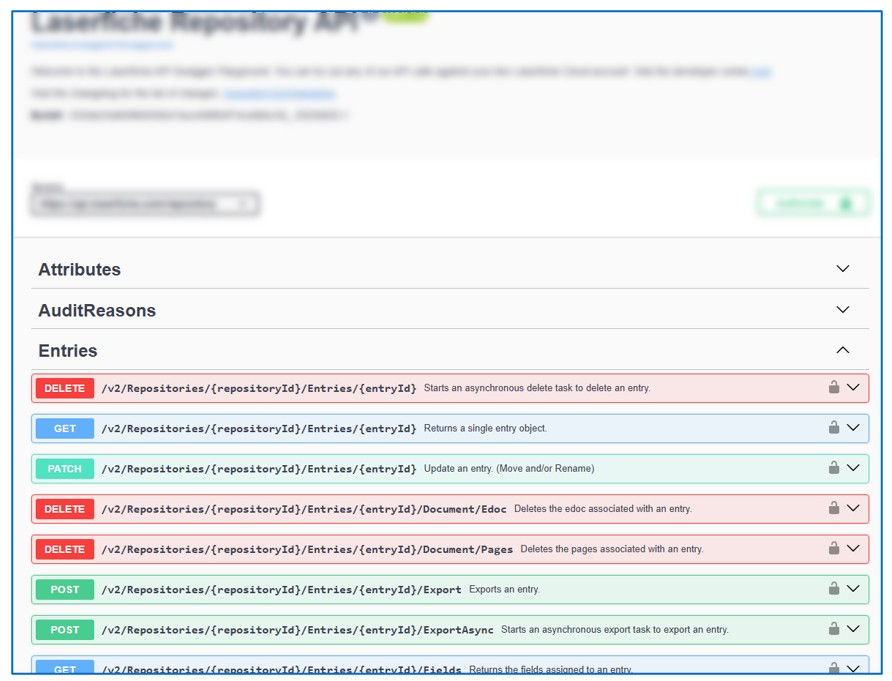
The Swagger pages allow you to test the endpoint results.

Boomi
Boomi, an Integration Platform as a Service (iPaaS), enables seamless connectivity between applications, data sources, and processes. Laserfiche Cloud is a SaaS-based enterprise content management (ECM) and business process automation platform. Their integration, launched via a formal partnership in February 2023, allows organizations to bridge Laserfiche's content services with over 1,500 other apps (e.g., Salesforce, Workday, Smartsheet) through Boomi's low-code connectors. This supports automated workflows, data synchronization, and end-to-end process orchestration, reducing manual effort and accelerating digital transformation.
The core of the integration is the Laserfiche Connector for Boomi, built on Laserfiche's APIs. It facilitates bidirectional data flow, such as uploading documents from external apps to Laserfiche Cloud, updating metadata, or triggering Laserfiche workflows from Boomi processes. It's designed for both Laserfiche Cloud and self-hosted setups, with a focus on security, scalability, and ease of use.
Key Benefits
Simplified Connectivity: Quickly link Laserfiche Cloud to cloud/on-premises apps without custom coding.
Automation Boost: Automate content routing, approvals, and analytics across systems.
Cost Efficiency: Low total cost of ownership via Boomi's drag-and-drop interface.
Scalability: Handles growing data volumes as your organization adopts more tools.
Security: Supports OAuth-based authentication and role-based access.

How the Integration Works
The connector operates via RESTful APIs over HTTPS, supporting operations like:
Document Management: Create, read, update, delete (CRUD) entries in Laserfiche repositories.
Metadata Handling: Sync fields like tags, status, or custom attributes.
Process Automation: Invoke Boomi processes from Laserfiche workflows or send web service requests the other way.
Search & Retrieval: Query Laserfiche content and pull it into Boomi for transformation.
Supported Directions:
Laserfiche to Boomi: Export documents/metadata to external systems.
Boomi to Laserfiche: Import data into Laserfiche Cloud for storage/processing.
Setup Guide
Setting up the integration is straightforward in Boomi's “AtomSphere” platform. Here's a high-level process (detailed in Laserfiche's documentation here: https://doc.laserfiche.com/laserfiche/en-us/Content/Boomi-Connector.html)
Step One:
Create a Connection in Boomi:
In Boomi Designer, go to Create New > Connection > Laserfiche Connector.
Select Platform: Laserfiche Cloud.
Enter credentials:
Base URL: Your Laserfiche Cloud instance (e.g., `https://your-org.laserfiche.com`).
Authentication: Use Service Principal (recommended for Cloud).
Create a Service Principal user in Laserfiche Admin with appropriate rights (e.g., Repository Admin).
Generate a Service Principal Key and Base-64 Encoded Access Key in Laserfiche Developer Console.
Service Principal Key and Access Key: Paste from Laserfiche.
Test the connection (ignore 404 on base URL—it's normal).


Step Two:
Build Operations:
Create a Connector Operation (e.g., Web Services Server for listening to Laserfiche requests).
Choose actions like Listen (for incoming from Laserfiche) or API calls (e.g., `/EntryManagement` for docs).
Map data fields between Laserfiche and target apps.

Step Three:
Configure Laserfiche Side (if bidirectional):
In Laserfiche Process Automation, add a Web Request rule to call Boomi's endpoint.
Set up authentication (e.g., token from Boomi's User Management).

Step Four:
Test & Deploy:
Use Boomi's testing tools to simulate flows.
Deploy to production atoms for runtime execution.

For a quick start, check Boomi's "Getting Started with Laserfiche" Recipe in their Discover catalog, since it includes pre-built processes for common scenarios.

Resources
Official Laserfiche Connector Guide (https://doc.laserfiche.com/laserfiche/en-us/Content/Boomi-Connector.htm)
Press Release: Laserfiche-Boomi Partnership (https://www.laserfiche.com/resources/press-center/press/laserfiche-joins-the-boomi-technology-partner-program/)
Boomi Marketplace: Search "Laserfiche" in Boomi's partner directory for templates.
Community Recipes: Boomi's article on [Starting with Laserfiche](https://community.boomi.com/s/article/Start-Connecting-with-Laserfiche).
In the Boomi Marketplace, or in the Laserfiche Solution Exchange, you can obtain pre-built “Connectors” that will link Laserfiche with your business application of choice. There are almost 80 Connectors to choose from as of this writing.
Boomi Marketplace Example:


Laserfiche Solution Marketplace Example:

Use this link to view all available Laserfiche Solution Marketplace choices. https://marketplace.laserfiche.com/listing?tt=IPaaSConnector&to=mostPopular
Laserfiche provides developers with low-code solutions to connect business applications to your Laserfiche repository content, either on-premise or cloud based.
Try it today!



Comments